Department-specific hubs
Surgery, Anesthesia, Administration, Inventory Management, ER/CC, Cardiology, Internal Medicine, Oncology/Radiation, CT Imaging, In-House Lab, Customer Service and Building Management.
JOSHUA VANCAMP · LEADERSHIP & WORKFLOW PORTFOLIO
Built from the clinical floor. A connected vision for assignments, communication, patient preparation, supplies, and the people moving every case forward.
LISTEN TO THE WALKTHROUGH · 8 MIN 38 SEC
Press play, then explore the chapters below. Playback starts only when you choose.
No features match those filters. Clear the search or select all features.
THE COMPLETE FEATURE WALKTHROUGH
One starting point for the work each person needs to do.
Surgery, Anesthesia, Administration, Inventory Management, ER/CC, Cardiology, Internal Medicine, Oncology/Radiation, CT Imaging, In-House Lab, Customer Service and Building Management.
Role assignments, coverage, important notes, bulletin messages and shortcuts organized around department work.
Readable appearances across phones, tablets and desktops, with consistent information in either mode.
VRCC HQ identity, mountain imagery, seasonal artwork and department character emblems.
Department panels, compact navigation, collapsible content and configurable module ordering.
Welcome experience, management preview, inventory proposal and advanced showcase materials.
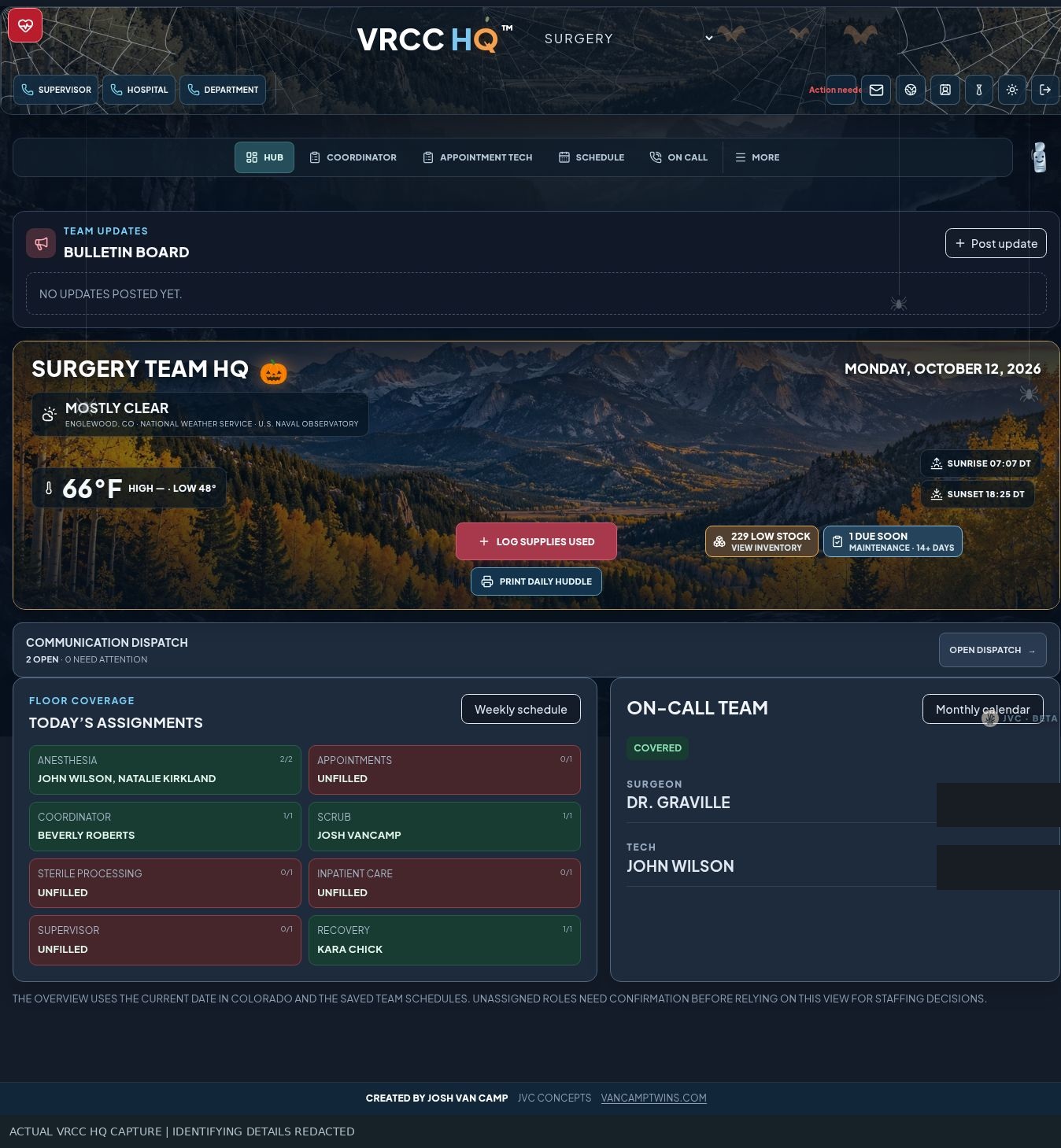
The Hub is the starting point. Assignments, coverage, messages, notes, and resources come together in department-specific spaces. A shared visual identity connects those spaces across the hospital, with light and dark modes, responsive layouts, mountain imagery, and recognizable department characters. Welcome pages and management presentations help introduce the platform to staff.
THE COMPLETE FEATURE WALKTHROUGH
Give each person a useful workspace with clear boundaries.
Access requests, administrator review, first sign-in and staff contact collection.
Doctor, technician, assistant and administrator roles, with membership in multiple departments.
Administrators choose hidden, view-only or role-based access for individual tools.
Department responsibility and administrative access are configured separately from ordinary staff access.
Enable staff accounts, update assignments and control access to administrative tools.
Role-sensitive navigation, administrative controls and limited visitor views.
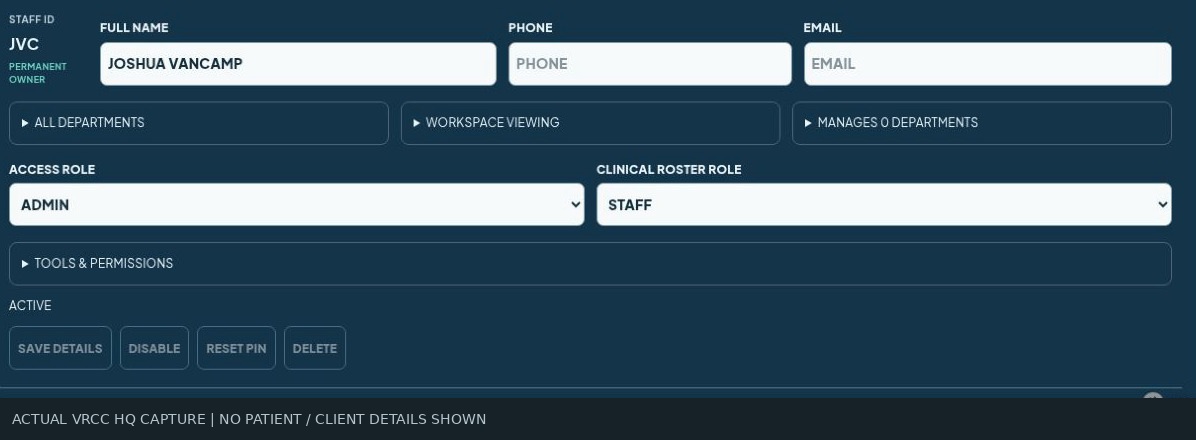
Each workspace follows the person's job. Administrators approve accounts, assign departments, and select hidden, view-only, or role-based access to individual tools. Leadership scope and account permissions are managed separately. Staff see a focused workspace; authorized administrators retain the controls. This external portfolio lets reviewers explore those capabilities without a hospital login.
THE COMPLETE FEATURE WALKTHROUGH
Make assignments and gaps visible before the day begins.
Calendar-based staffing with all-day role assignments and visible open positions.
Anesthesia technicians, appointment technician, coordinator, scrub-in, sterile processing, patient care, recovery and supervisor coverage.
Default assignments for recurring responsibilities, with editable daily coverage.
Appointment and operating-room responsibilities visible alongside staffing.
A dedicated anesthesia staffing workspace.
Daily huddle, weekly schedule and role-preference print views for use away from a screen.
Team organization and unfilled coverage displayed within the workflow.
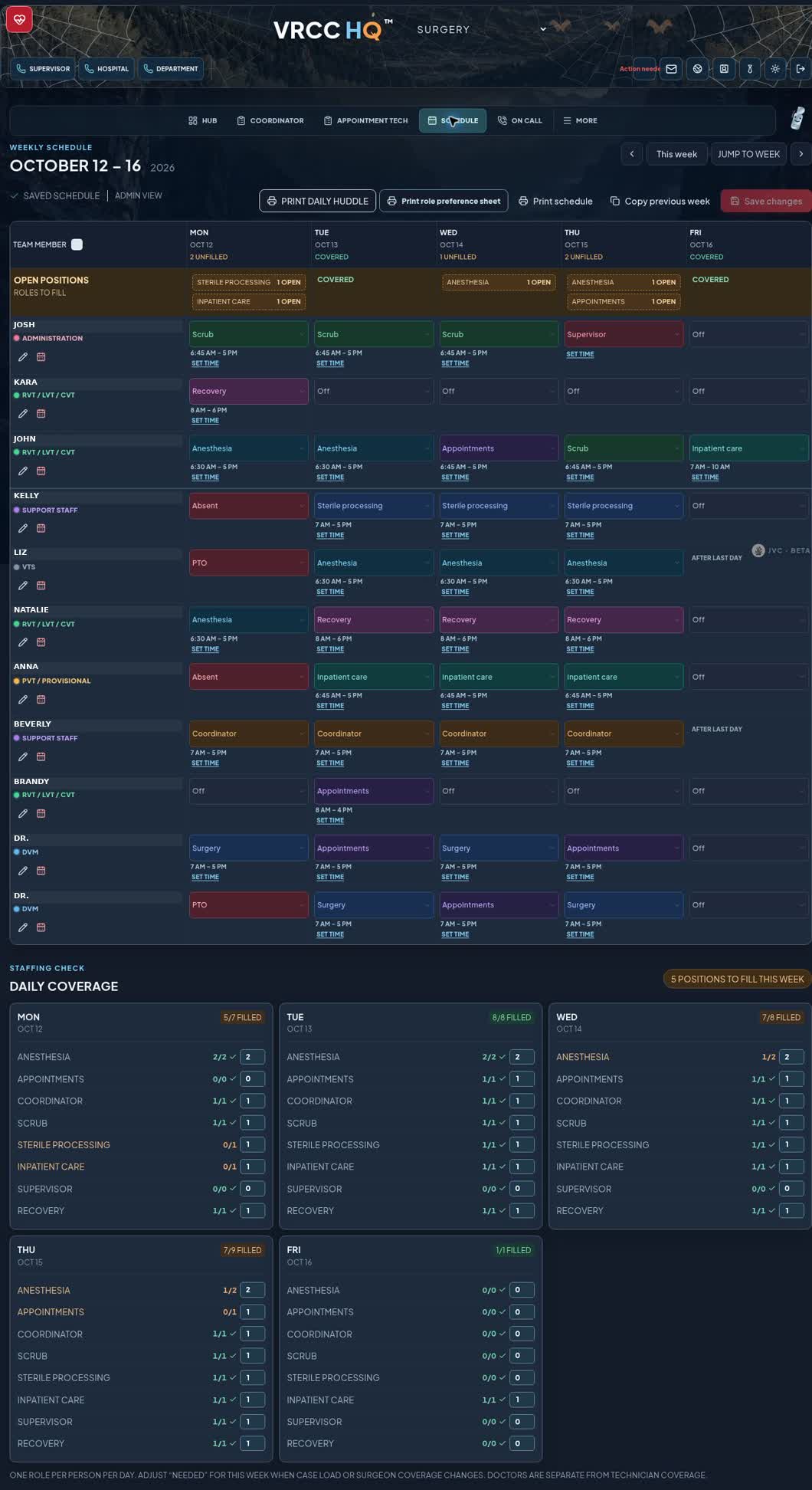
The surgery calendar makes both assignments and gaps visible. All-day roles cover anesthesia, appointments, coordination, scrub-in, sterile processing, patient care, recovery, and supervision. Recurring assignments reduce setup, while doctor coverage and a separate anesthesia schedule support planning. Daily huddles, role references, and printable schedules carry that plan into the morning meeting and onto the floor.
THE COMPLETE FEATURE WALKTHROUGH
Connect coverage, case logging and management review.
Organize the on-call schedule and departmental coverage.
Record patient name, optional patient ID, surgeon and confirmation that invoice charges were entered.
Maintain on-call records for follow-up and reporting.
A Monday report workflow for the surgery supervisor, hospital director and HR manager; a recurring schedule is configured.
A print-friendly dispatch reference.
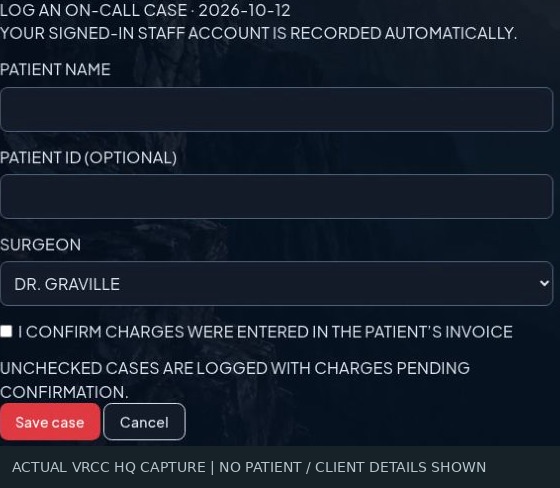
On-call coverage continues into case reporting. Staff record the patient name, optional identifier, surgeon, and whether charges were entered. A Monday report workflow is configured for the supervisor, hospital leadership, and HR, giving them a consistent record to check against payroll. The calendar also provides a printable coverage reference.
THE COMPLETE FEATURE WALKTHROUGH
One request, one owner and a clear next action.
Separate focused work areas instead of one long scrolling page.
Patient-related requests with source, priority, owner, assigned doctor or staff member, deadline and next action.
Attach documents, records and images directly to the dispatch request.
Track acknowledgement, doctor review, laboratory results, upload confirmation and required follow-up.
Named next owners, handoffs, escalation and a chronological activity record.
Completion controls and an administrator closure pathway for requests with incomplete review steps.
Organize outstanding correspondence, waiting items, reminders and follow-up work.
Simplified forms, smaller cards and corrections to unintended request opening and active indicators.
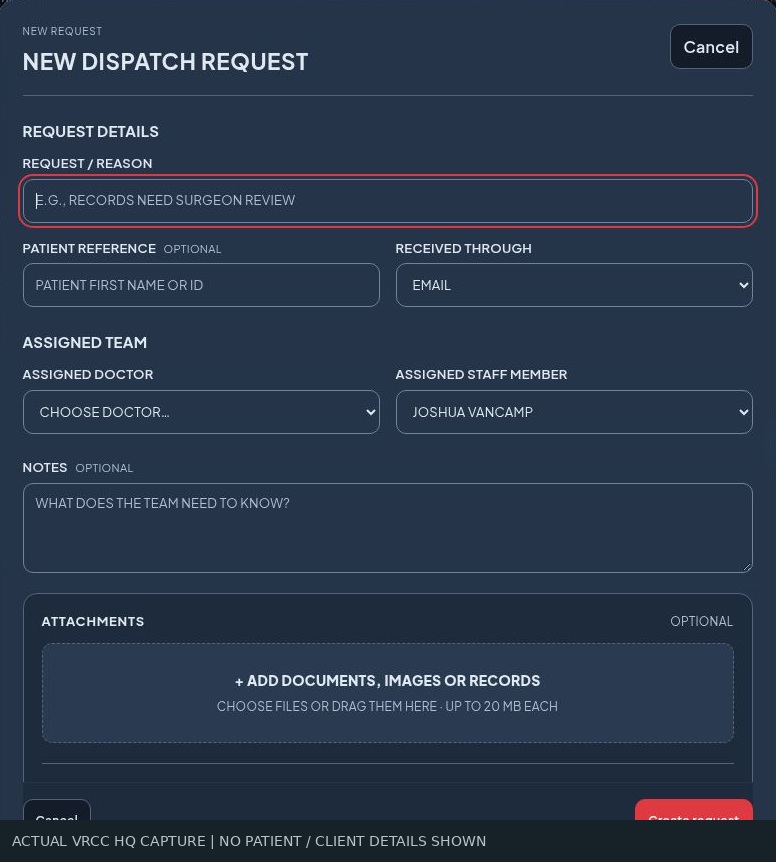
Communication dispatch turns a request into an accountable next action. Priority, deadline, ownership, clinician assignment, records, and images stay with the request. Laboratory follow-up and clinical review have acknowledgement and completion steps. Handoffs, escalation, callbacks, and activity history help the coordinator track unfinished work. Administrators can close requests when review steps remain incomplete. Compact forms and reliable active indicators are still being refined.
THE COMPLETE FEATURE WALKTHROUGH
Bring the information together before the surgeon’s visit.
Create consults, rechecks, surgery visits and other appointments with surgeon and appointment-technician assignments.
Track identity, records, forms, diagnostics, history review and readiness for the surgeon.
Presenting complaint, timeline, medications, allergies, diagnostics, client communication and next action.
Upload referral records, forms, imaging-related files and other originals with categories and referring-hospital context.
Staff confirm that each record belongs to the correct patient and client.
Preserve a protected link to the original imaging study; this is not a diagnostic image interpretation tool.
Completed visits can be archived while retaining documents and review history.
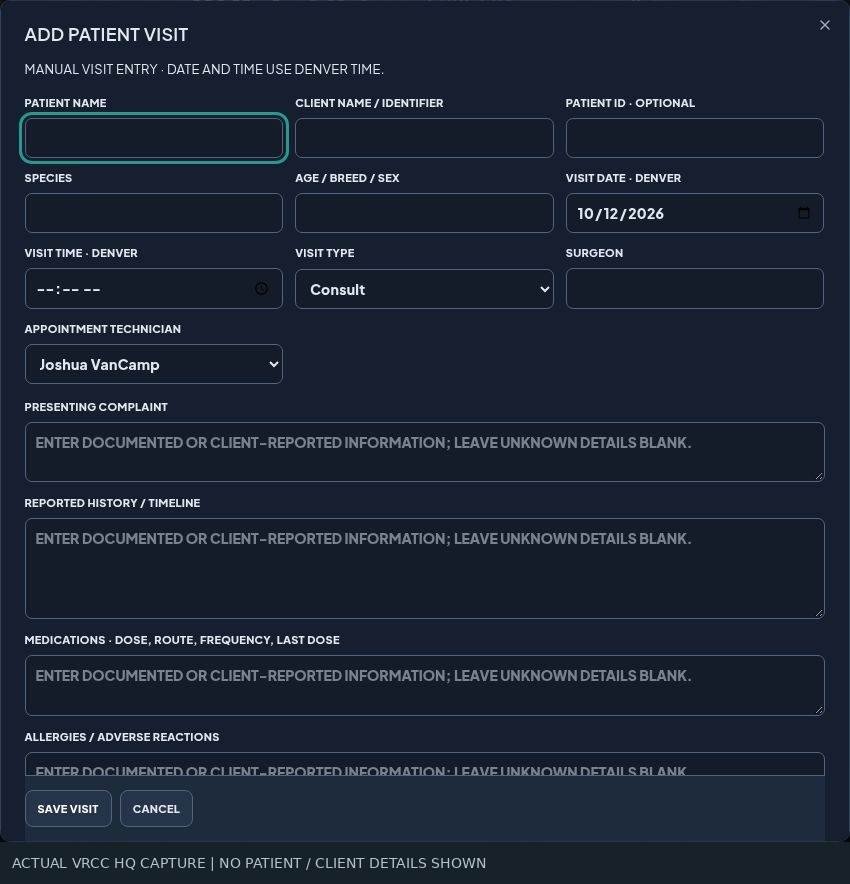
Appointment preparation creates one workspace for the visit. A surgeon and appointment technician can be assigned to a manually entered appointment. A checklist tracks identity, referral records, forms, diagnostics, and history review. Intake captures the complaint, timeline, medications, allergies, previous procedures, and communication. Documents from multiple referring hospitals stay together, with patient and client verification, original imaging links, and visit archiving.
THE COMPLETE FEATURE WALKTHROUGH
Turn records into a reviewable narrative with traceable sources.
Read supported uploaded records as part of the history-generation workflow; expose extracted text and reading limitations.
Draft a complaint-focused narrative from relevant records and optional intake notes.
Page references, record coverage and flags for unreadable, excluded or incomplete information.
Edit a draft, confirm important details and mark it reviewed; changed records or intake make the history outdated.
Choose the current history and supported original documents to assemble a downloadable packet.
Retain originals; combined consent pages are reference copies, with signed originals and completion certificates preserved.
PDF and supported image pages can be included; DOCX, DICOM and ZIP originals require appropriate handling rather than being silently treated as readable pages.
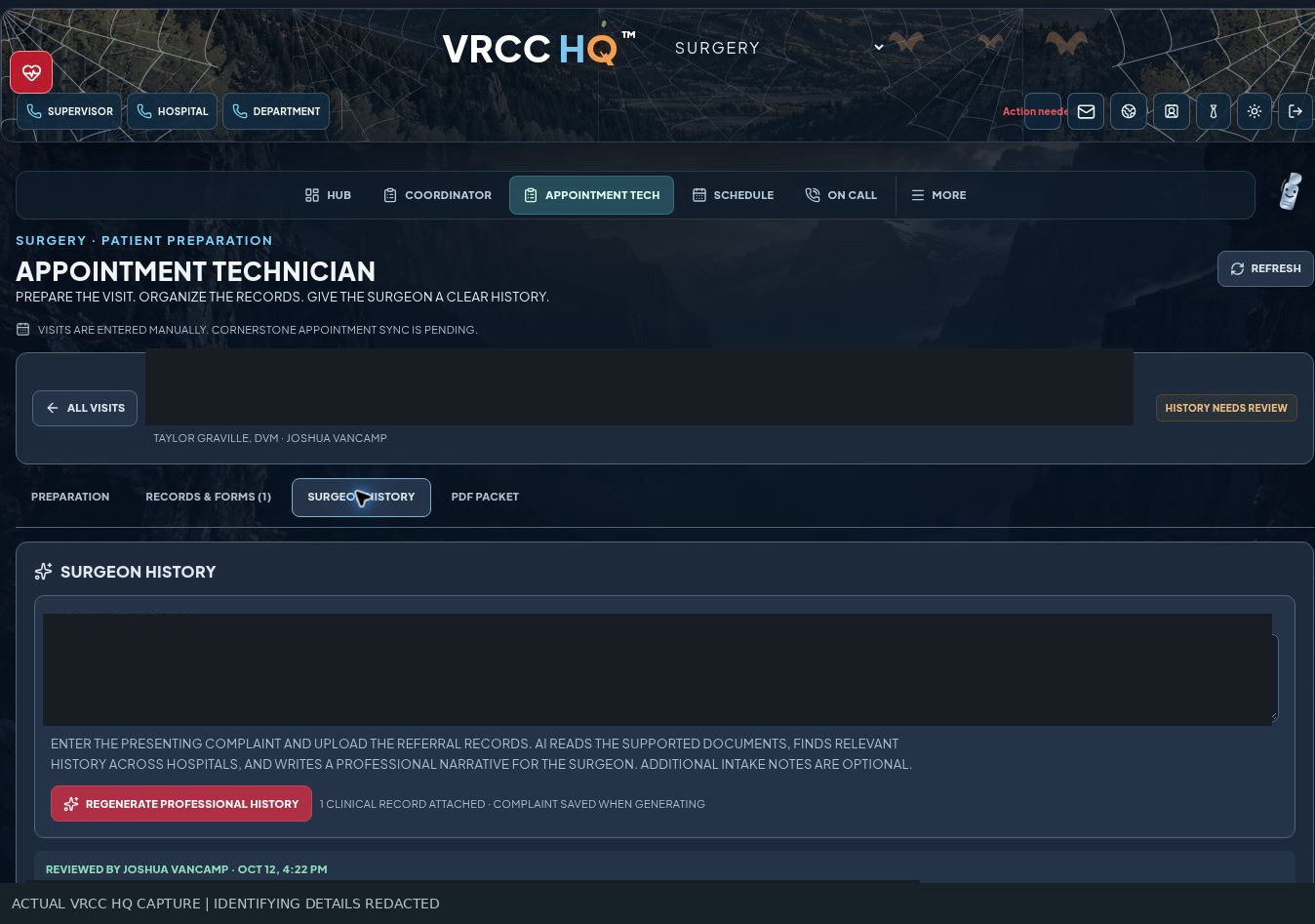
The next layer is AI-assisted history preparation, currently in development and validation. Supported records and the presenting complaint inform a professional draft, with source references, reading coverage, and flags for missing information. Staff review and edit it before clinical use. New records or intake changes mark the draft as outdated. A PDF packet workspace brings the current history together with selected supported originals, while preserving signed documents in their original form.
THE COMPLETE FEATURE WALKTHROUGH
Keep completed paperwork connected to the right workflow.
Production API access was reported verified during setup; configuration controls are administrator-only.
Organize forms and completed documents within the department workflow.
Filter documents by their associated department.
Group related DocuSign results for the same patient.
Associate consent documents with the relevant request or visit workspace.
Preserve authoritative signed files and certificates alongside reference packets.
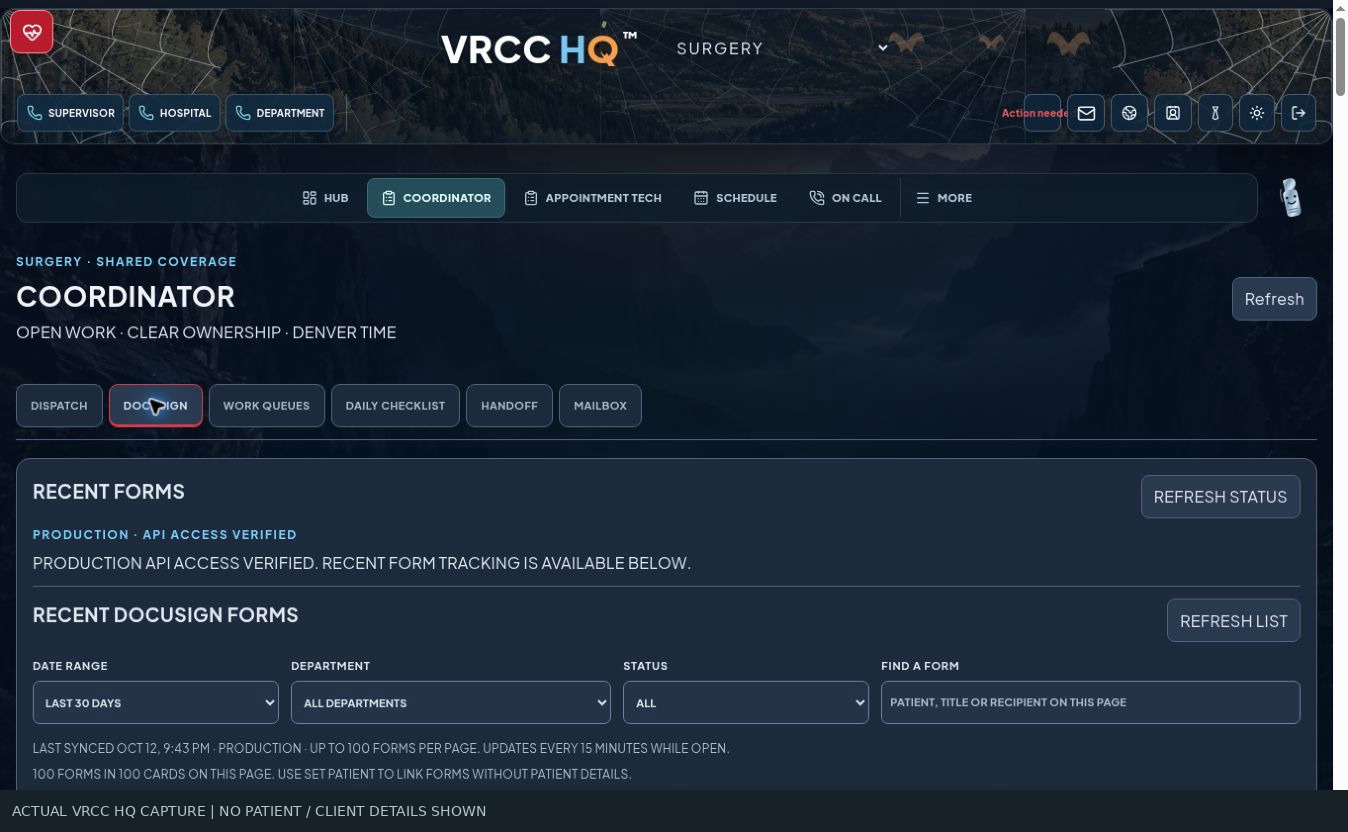
DocuSign connects consent paperwork to the visit and its follow-up. Production API access was verified during setup. Department filters and patient-based grouping organize completed documents, which can support dispatch and appointment preparation. Original signed files and completion certificates remain available. Connection settings stay administrator-only, and this showcase exposes no hospital consents or account access.
THE COMPLETE FEATURE WALKTHROUGH
A structured stock workspace built for the supplies teams actually use.
Administrative inventory oversight with department-specific stock workspaces.
Import historical inventory information, preserve tracked stock and distinguish audited counts from unconfirmed quantities.
Separate on-hand quantities, replenishment targets and surgeon preferences.
Group cortical, locking and variable-angle locking screws by size, type and length.
TPLO, straight, T, DFO, ilial, distal humeral, carpal/tarsal arthrodesis and TPLO/MPL organization, with side and hole-count detail where applicable.
Arthrex product-number reference with source links; adding a catalog item does not claim that it is stocked.
Update item details and separate inactive items from the active workspace.
Reorder visibility, collapsible lists and plate-size coverage checks.
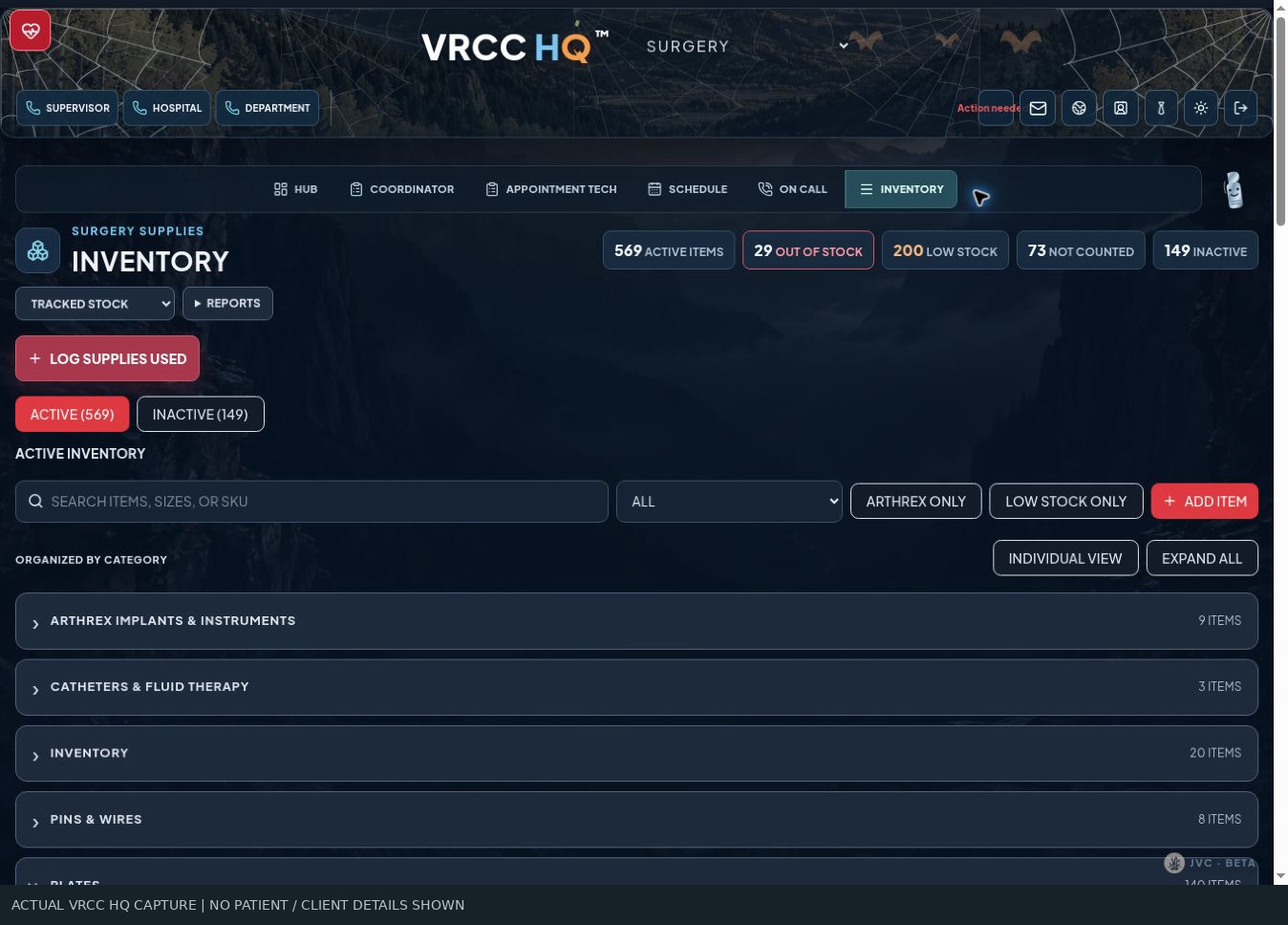
Inventory combines hospital oversight with department stock. Surgery supplies are organized by the decisions staff make: screw family, size, type, and length; plate family, side, and hole count. Actual stock, expected stock, and surgeon preferences remain separate. Product numbers, item editing, inactive stock, low-stock views, and plate-size coverage support database maintenance. Historical imports and handwritten count reconciliation still require verification.
THE COMPLETE FEATURE WALKTHROUGH
Capture use while the details are still in front of the team.
Large selection paths for plates, screws, pins/K-wires and suture.
Plate size, family and side; screw size, length and quantity, with defaults based on the selected plate.
Track material, size, quantity and needle information.
Review supplies used by case and reporting period.
Recurring Monday reporting to the surgery supervisor; a schedule is configured.
Procedure preparation lists and surgeon-specific preferences.
Instrument-pack reference pages and procedure-specific pull-list resources.
Department requests support communication with inventory management.
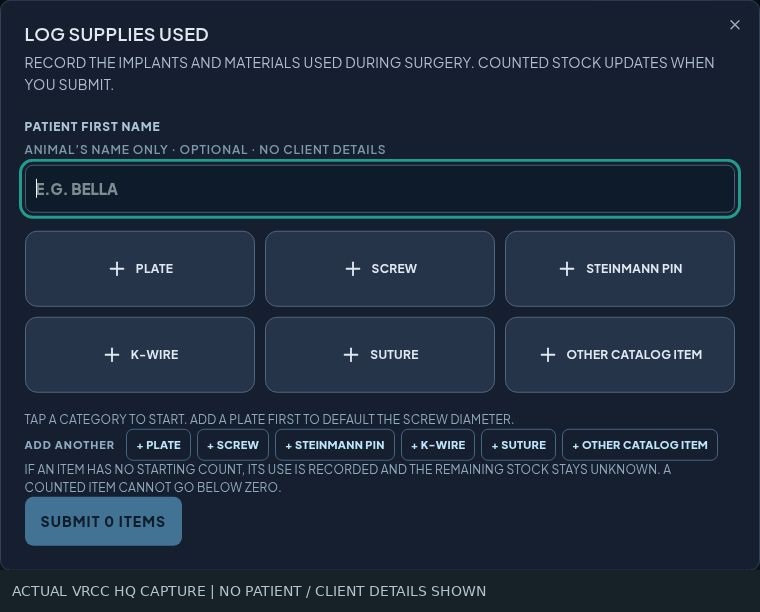
In the operating room, quick supply entry follows that same selection logic. Plates, screws, pins, wires, and suture have focused paths. Screw size can default to the selected plate; suture entry captures material, size, and needle. Pick lists, procedure pull lists, surgeon preferences, instrument-pack references, and supply requests support preparation. Usage reports support replenishment, with a weekly orthopedic-use report schedule configured for the surgery supervisor.
THE COMPLETE FEATURE WALKTHROUGH
Separate evidence of purchasing from evidence of stock.
CSV import with duplicate invoice handling, year filtering and invoice-level purchasing history.
Sales-order and purchase-order references, invoice amounts and shipment information in an authorized administrative view.
Requested comparison of historical SKU quantities, usage frequency and most recent item order; requires suitable line-item source data.
Print counted items meeting the configured zero-stock and reorder criteria.
Stock, target and preference references, including size and side where applicable.
Count sheets, import-review print views and inventory-use reports.
Management-facing material explaining the inventory workflow and proposed improvements.
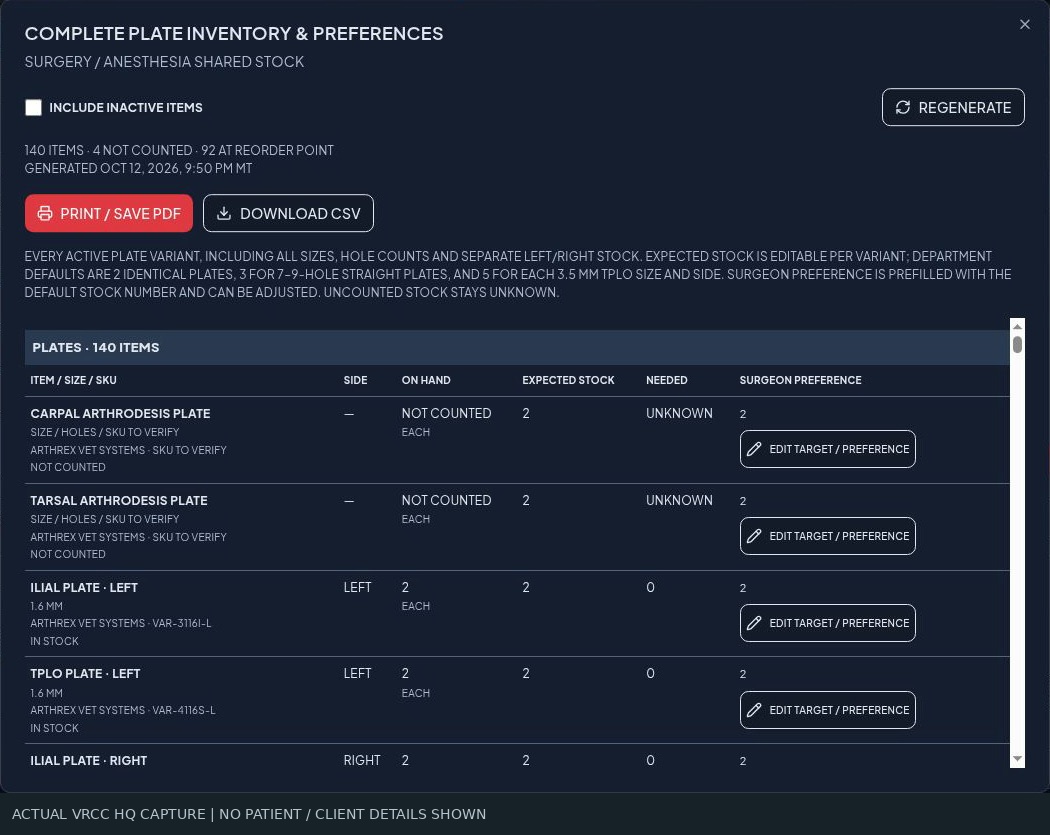
Purchasing records tell a separate story from stock and usage. The Arthrex CSV invoice workspace handles duplicates, year filters, and purchasing and shipment references. Those exports lack product lines, so item-level last-order dates and quantities remain planned until suitable data is available. Printable outputs cover audited out-of-stock lists, plate and department inventory, count sheets, import review, and supply usage. An inventory proposal explains the intended operational improvements.
THE COMPLETE FEATURE WALKTHROUGH
Make responsibility and follow-up easier to find.
Direct staff communication with read-state and response tracking.
Requests, dispatch follow-up and reporting workflows can notify the relevant staff member.
Urgent, equipment, general and hospital-wide communication categories.
Hospital leadership and department responsibility displayed as a reference.
Find team roles, doctors and authorized internal contact information.
Hospital and department equipment references, maintenance records and requests.
Department documents, hospital resources and shared reference links.
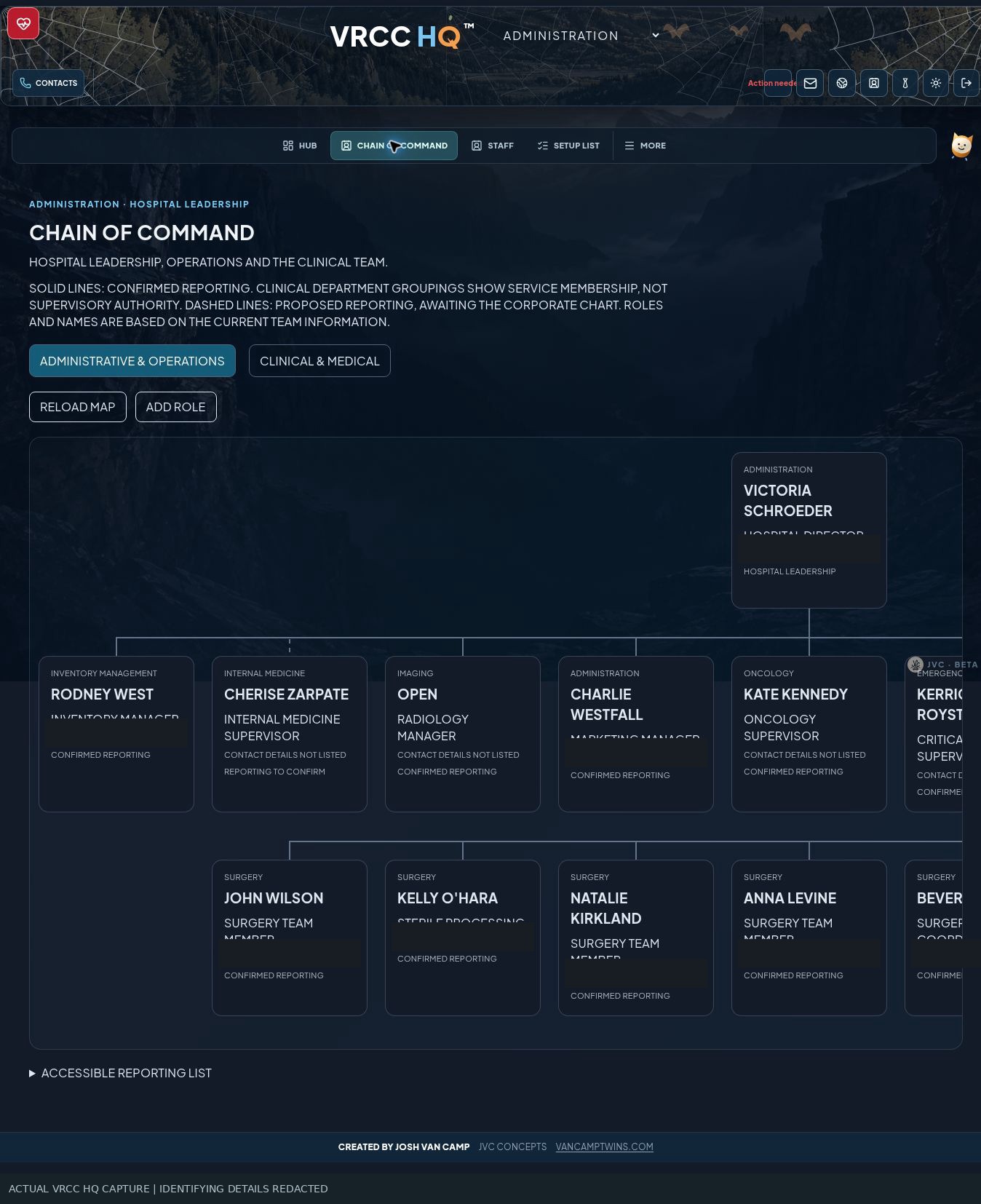
Across departments, direct messaging and workflow notifications support follow-through. Bulletin categories distinguish urgent issues, equipment notes, general updates, and hospital-wide information. Leadership references and directories identify who owns a question. Maintenance and equipment workspaces capture operational issues, while shared documents and links keep reference material within reach.
THE COMPLETE FEATURE WALKTHROUGH
Organize learning while preserving clinical responsibility.
Existing manuals and cheat sheets organized into role-based modules with steps, practice activities and checklists.
Coordinator communication, admissions, ER transfers, OR preparation, recovery and sterile processing content.
References to original materials, escalation guidance and reminders to confirm current protocols.
Checklist-style tracking exists; a comprehensive individual competency and sign-off database is a future extension.
Medication phases, monitoring observations, recovery/handoff and duplex print format.
Calculation support using clinician-entered orders and concentrations; requires independent clinical verification.
Plumb’s integration is pending; the calculator is kept restricted while this work is reviewed.
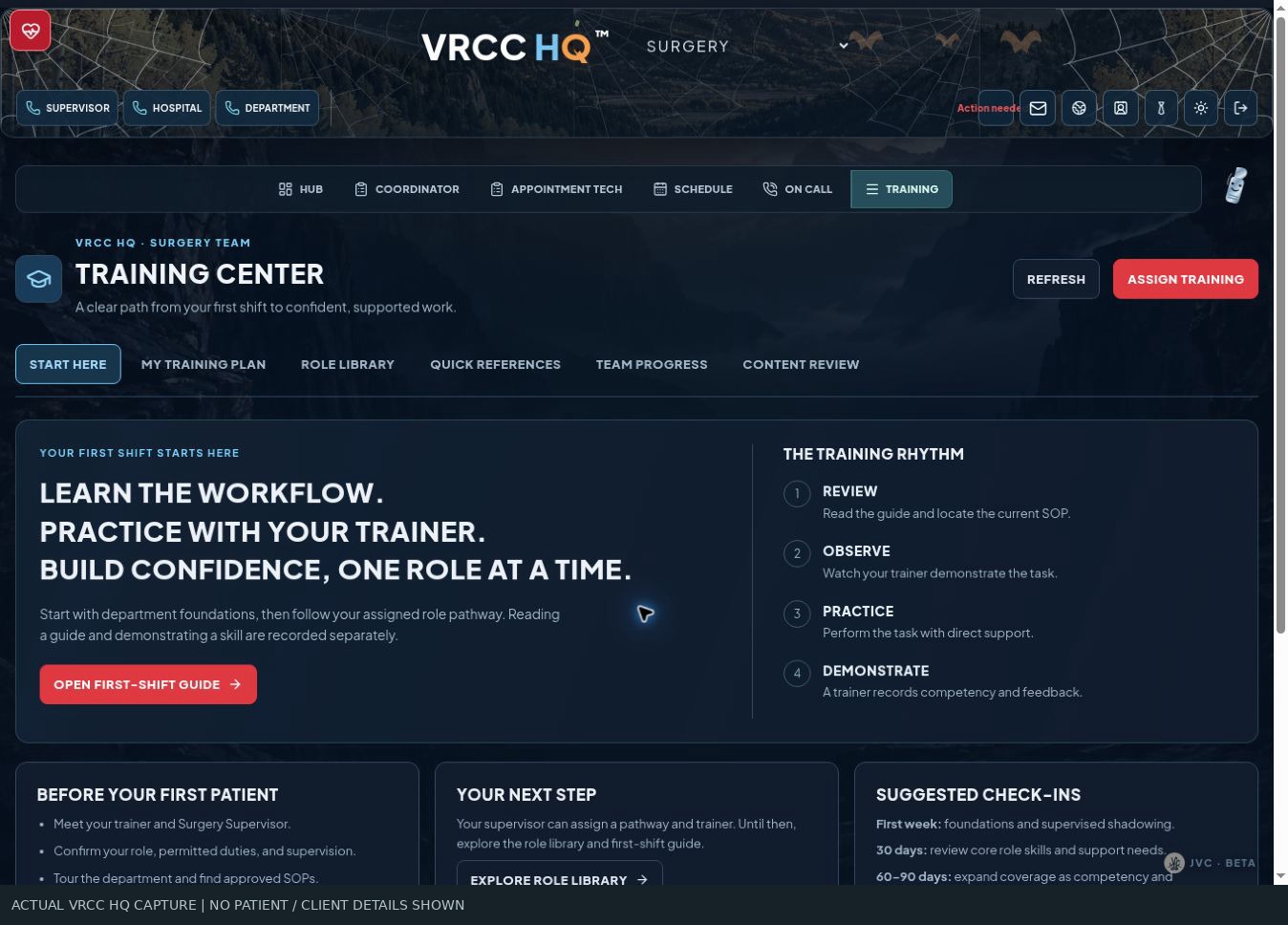
Training turns existing manuals and cheat sheets into structured surgery modules. Practical steps, source references, practice activities, checklists, and escalation points cover coordination, admissions, transfers, operating-room preparation, recovery, and sterile processing. A comprehensive individual competency database is planned beyond checklist tracking. Printable anesthesia worksheets cover protocols, monitoring, and recovery handoffs. Calculation tools remain restricted and under development; Plumb's integration is pending, and clinical verification is required.
THE COMPLETE FEATURE WALKTHROUGH
Let leaders shape their own department’s workspace.
Notes, checklists, resource links, card groups and tables arranged in one or two columns.
Inventory, equipment, maintenance, supplies, schedules, on-call, team, roles, resources and contacts.
Department leaders can describe edits conversationally; live behavior depends on configuration and supported tool scope.
Proposed changes display a review-and-confirm step, with revision handling and undo support.
Orion, Clip, Blade, Helma, Pace, Endo, Ding, Epi, Rad, Beak and Buzz, plus the Building Management assistant.
Character presentation and interactions introduce the department identities.
Department editing does not itself grant control of clinical records, core account permissions or protected hospital systems.
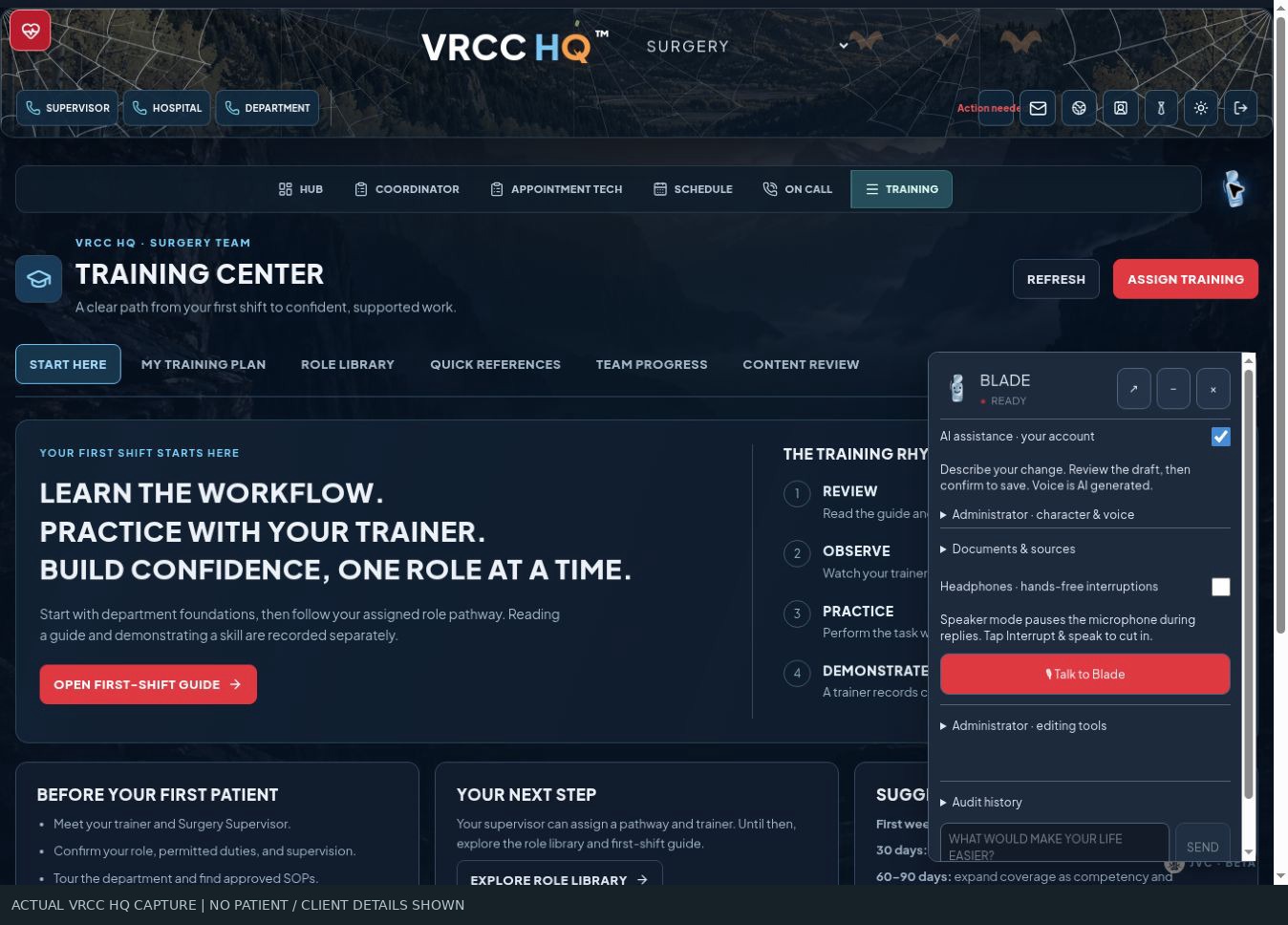
Department leaders can shape their workspace with notes, checklists, links, cards, and tables, plus records for equipment, maintenance, schedules, roles, contacts, and other operations. A developing voice and text assistant lets leaders describe changes conversationally. Proposed edits are reviewed before saving, with revision handling and undo support. Orion, Clip, Blade, Helma, and the specialty characters give each department a recognizable identity. Builder tools stay within their defined editing scope.
THE COMPLETE FEATURE WALKTHROUGH
Show the full vision, with honest boundaries around unfinished work.
Requested appointment and coordinator callback synchronization; currently appointments can be entered manually.
Import and export of discharge instructions through an approved integration path.
Bring incoming surgery mailbox messages into the coordinator workflow; direct mailbox integration is not established here.
Unread counts are explicitly not connected in the current inbox component.
Remote monitoring and forwarding ideas remain exploratory; no verified forwarding setup is claimed.
Live vendor ordering and SKU-level historical reconciliation remain pending; catalog reference and invoice import are separate built features.
Extend departmental ownership, training, inventory and workflow refinement across the hospital.
A recorded ElevenLabs walkthrough and the chapter-based narration script are available in this portfolio.
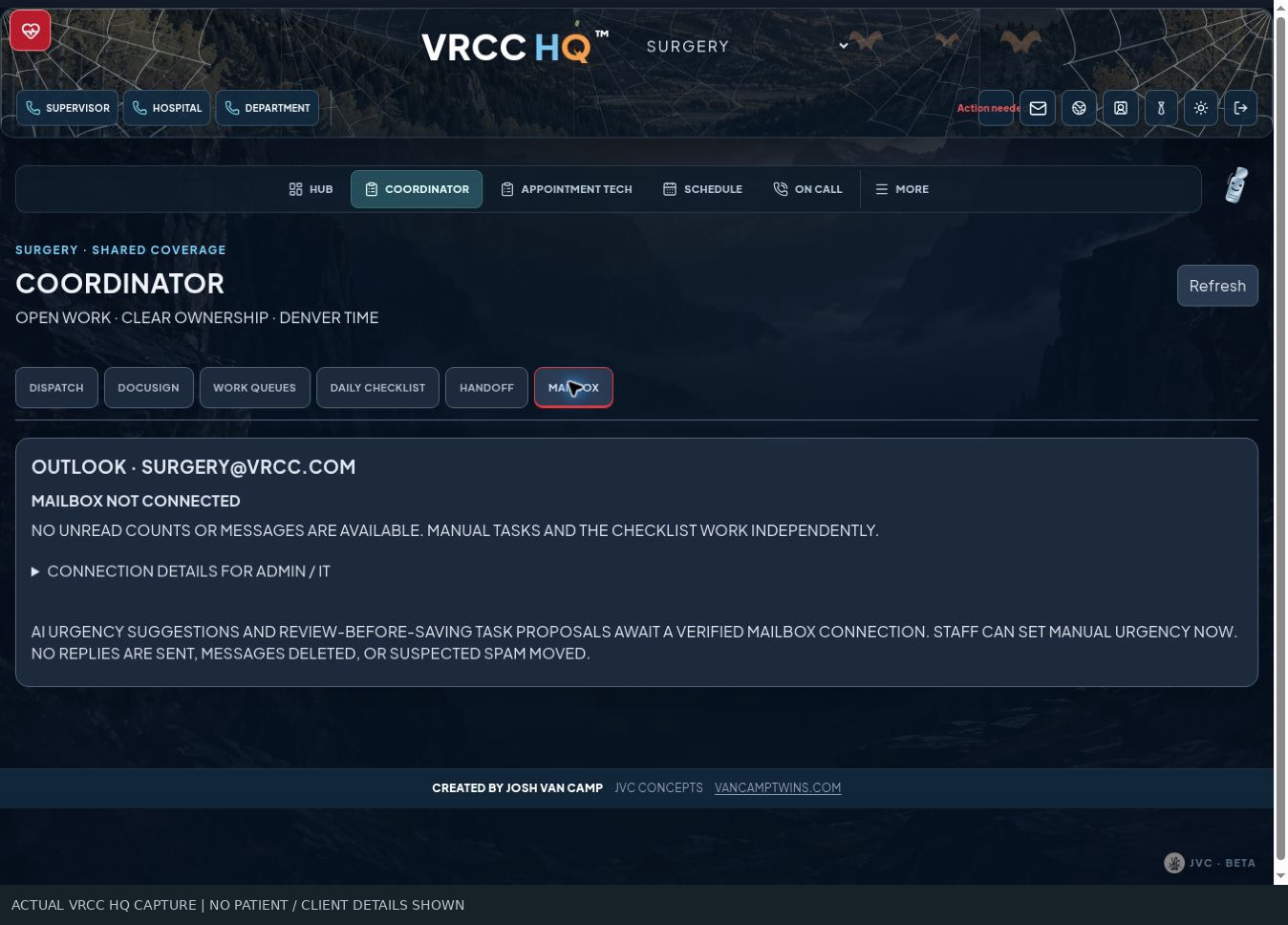
The roadmap connects these workspaces to the hospital's wider systems. Cornerstone appointment and callback synchronization, discharge exchange, shared Outlook triage, unread indicators, and weekend email monitoring remain pending or exploratory. Live Arthrex ordering and item-level purchasing reconciliation are also planned. Broader departmental rollout, real-screen documentation, recorded narration, and production workflow validation continue.
FROM THE CLINICAL FLOOR TO THE WORKFLOW
Joshua’s approach to leadership starts with seeing a problem, taking ownership, and building a practical way forward. A stronger hospital starts with a team that can see the plan, own the next action, and trust the handoff. This is only the beginning.
HOW TO READ THE STATUS LABELS
Built means a current interface and supporting implementation were identified in the project source reviewed October 12, 2026. It is not an independent verification that every production workflow has passed end-to-end testing. In-development and planned items are included to show the full scope. This portfolio claims no measured time savings, payroll outcomes or clinical results.
ELEVENLABS-READY WALKTHROUGH
The narration follows the same order as this page, includes the unfinished work, and explains the status of the integrations. Approximate reading time: 8 minutes. The recorded walkthrough is available above.
This is what Joshua brings to leadership: the willingness to see a problem, take ownership, and build a practical way forward. Clinical experience gives the project its direction. Attention to the team's daily work gives it its purpose.
The vision is ambitious, and the unfinished work is visible. Every next step has to earn its place with the people who use it.
A stronger hospital starts with a team that can see the plan, own the next action, and trust the handoff. That is the standard driving this project.
VRCC HQ. Built from the floor. Designed for the whole hospital. And this is only the beginning.
15 of 15 chapters now have reviewed, actual app captures. Empty forms show the interface without creating demo records. Redactions are opaque and baked into the images. No patient records, private staff contacts, signed consents, purchasing amounts or credentials are shared.